
PDF-Optical Audio Optical Audio Press Allow and wait for
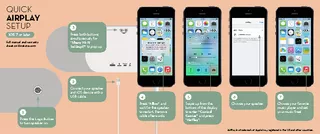
Remove cable afterwards 7 Choose your favorite music player and set your music free 5 Swipe up from the bottom of the display to enter Control Center and press AirPlay
Download Presentation
"Optical Audio Optical Audio Press Allow and wait for" is the property of its rightful owner. Permission is granted to download and print materials on this website for personal, non-commercial use only, provided you retain all copyright notices. By downloading content from our website, you accept the terms of this agreement.
Presentation Transcript
Transcript not available.